

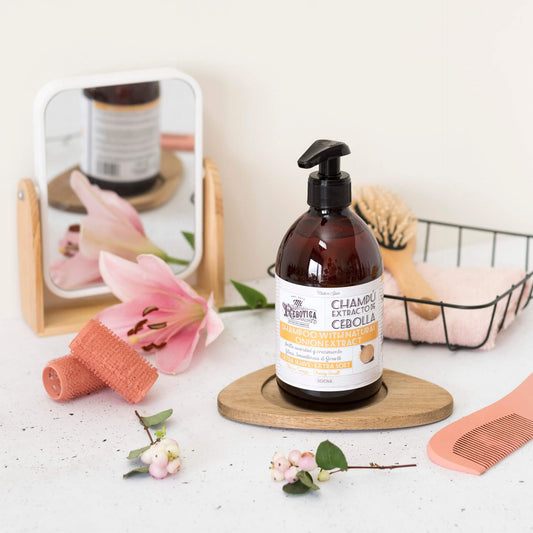






Product Photography: 28% Conversion Boost with Backdrops
Poor product photos kill sales before you even get a chance. A pixelated image or distracting background instantly erodes buyer trust, costing you conversions. The right backdrops and lighting techniques can transform ordinary product shots into compelling visuals that drive purchases. This guide walks you through selecting backdrops, lighting setups, composition strategies, and post-processing workflows to create professional product photos that sell.
Table of Contents
- Introduction: Why Backdrops Matter In Product Photography
- Prerequisites: Tools, Knowledge, And Conditions Before You Start
- Choosing The Right Backdrop For Your Product
- Lighting Your Product: Techniques For Flattering Illumination
- Styling Your Product: Composition And Props For Social Media And E-Commerce
- Common Mistakes And How To Fix Them
- Post-Processing Essentials
- Expected Outcomes And Success Metrics
Key Takeaways
| Point | Details |
|---|---|
| Consumer decisions hinge on visuals | 93% of consumers consider visual appearance the key factor in purchase decisions. |
| Backdrop choice impacts sales | Optimized vinyl backdrops can increase conversion rates by 28% in e-commerce. |
| Efficient setups save time | Consistent lighting and composition cut shoot time by 30%, streamlining workflow. |
| Mistakes erode trust | Poor lighting and backgrounds reduce buyer confidence by over 60%, hurting sales. |
| Smartphones deliver quality | Proper smartphone setups yield 80%+ professional-quality photos with the right techniques. |
Introduction: Why Backdrops Matter in Product Photography
Product images are the first and often only touchpoint with your buyers. When someone lands on your listing, they judge quality within seconds based on visuals alone. Backdrop choice directly shapes that perception. A messy or inconsistent background signals unprofessionalism, while a clean, well-chosen backdrop elevates your product and builds trust.
Research shows 93% of consumers consider visual appearance the key factor in their purchase decisions. Your backdrop is not just scenery; it’s a sales tool. Vinyl backdrops, for example, offer vibrant, high-resolution prints that stay consistent across shoots. They resist spills and stains, making them ideal for food, cosmetics, and jewelry photography where mess is inevitable.
Quick Win: Swapping a cluttered background for a professional vinyl backdrop can increase your conversion rate by up to 28%.
Many photographers assume all backdrops perform equally. That’s a costly mistake. Material, texture, and color each influence lighting behavior, glare, and post-processing ease. Paper backdrops tear easily and show wear after a few shoots. Fabric wrinkles and absorbs spills. Vinyl, on the other hand, wipes clean and lies flat, reducing editing time and ensuring repeatable results.
Choosing the right backdrop also depends on your product type and platform requirements. Amazon and eBay mandate white or neutral backgrounds for main product images. Instagram and Pinterest favor lifestyle shots with textured or gradient backdrops that tell a story. Understanding these nuances is foundational to creating images that convert browsers into buyers.
Investing in quality backdrops saves you time and money in the long run. You avoid reshoots, cut editing hours, and deliver consistent visuals that align with brand identity. The backdrop is where pro product photography starts.
Prerequisites: Tools, Knowledge, and Conditions Before You Start
Before you press the shutter, gather your gear and understand the requirements of your target platforms. The right tools and knowledge prevent costly mistakes and wasted time.
Essential Equipment:
- High-quality camera or smartphone with manual controls
- Sturdy tripod to eliminate shake and ensure consistent framing
- Lighting modifiers like softboxes, reflectors, or diffusers
- Clean, durable backdrops suited to your product type
- Editing software for post-processing and color correction
Your camera doesn’t need to be expensive. Modern smartphones deliver stunning results when paired with proper lighting and composition. The key is stability and control. A tripod is non-negotiable; it keeps your product centered and angles consistent across shots.
Familiarize yourself with e-commerce and social media image requirements. Amazon requires pure white backgrounds (RGB 255, 255, 255) for main listings. Shopify and Etsy are more flexible but still favor clean, uncluttered visuals. Instagram thrives on lifestyle imagery with context and story. Knowing these specs upfront prevents rejected uploads and wasted effort.
Pre-shoot planning dramatically improves efficiency. Create a shot list outlining angles, props, and lighting setups for each product. This roadmap keeps sessions focused and reduces decision fatigue. Having a consistent lighting setup and shot plan improves efficiency and photo quality across sessions by about 30%.
Access to professional backdrops is critical. Vinyl backdrops are water-resistant, easy to clean, and offer vibrant, high-resolution prints. They work well for close-ups and messy shoots involving oils, liquids, or pigments. Check out this studio-quality backdrop setup guide to prepare your space correctly.
Finally, ensure your shooting area has adequate space and access to natural or controllable artificial light. Poor lighting conditions are the top reason product photos fail, regardless of backdrop quality.
| Requirement | Description | Why It Matters |
|---|---|---|
| Camera/Smartphone | High-resolution sensor with manual mode | Captures detail and allows control over exposure |
| Tripod | Stable, adjustable mount | Ensures consistent framing and eliminates blur |
| Lighting Gear | Softboxes, reflectors, diffusers | Controls shadows, highlights, and color temperature |
| Professional Backdrop | Vinyl or matte material suited to product | Reduces glare, provides consistency, minimizes editing |
| Shot Plan | List of angles, props, settings | Streamlines workflow, prevents reshoots |
Choosing the Right Backdrop for Your Product
Your backdrop must complement your product and meet platform requirements without stealing the spotlight. The wrong choice causes glare, distracting textures, or non-compliant images that platforms reject.
White backgrounds are essential for major marketplaces. Amazon, eBay, and Walmart all mandate pure white or neutral backdrops for primary product images. This requirement ensures consistency across listings and keeps the focus on the product. A matte white vinyl backdrop eliminates reflections and provides a clean canvas for editing.
For glossy products like watches, jewelry, or electronics, matte backdrops are your best friend. Shiny surfaces reflect everything, including your backdrop’s texture. A matte finish minimizes unwanted reflections and glare, allowing the product’s natural shine to stand out. Vinyl backdrops offer durability, spill resistance, and vibrant high-resolution prints suitable for close-ups or messy shoots.

Textured and gradient backdrops elevate lifestyle and luxury product imagery. A marble or wood texture adds sophistication to jewelry and fashion shots. Gradient backdrops create depth and dimension, making products feel premium. These work exceptionally well for social media content where storytelling and aesthetics drive engagement.
Pro Tip: Test your backdrop by shooting a high-gloss product under your lighting setup. If reflections overpower the product, switch to a matte finish or adjust your light angles.
Choose backdrop size based on your product dimensions. Small items like cosmetics or jewelry fit on 2x3 foot backdrops. Larger products like handbags or electronics need 4x6 foot or bigger surfaces. Undersized backdrops force awkward cropping and limit composition flexibility.
Vinyl backdrops are particularly effective for food and cosmetics photography where spills happen. They wipe clean instantly, allowing you to continue shooting without delays. Learn more about professional vinyl backdrops and why they outperform paper and fabric alternatives. For additional insights, explore the benefits of vinyl backdrops for editing and trust and practical shooting tips for vinyl backdrops.
| Backdrop Type | Material | Pros | Cons | Best For |
|---|---|---|---|---|
| Vinyl | PVC-based, water-resistant | Durable, easy to clean, vibrant prints, flat surface | Heavier, can show creases if stored improperly | Food, cosmetics, jewelry, e-commerce |
| Paper | Smooth paper roll | Affordable, seamless look, easy to replace | Tears easily, not reusable, absorbs spills | Budget shoots, large sets, one-time use |
| Fabric | Cotton or polyester | Soft textures, portable, lightweight | Wrinkles, absorbs stains, inconsistent color | Lifestyle, fashion, social media content |
| Textured (marble, wood) | Vinyl or laminate | Adds depth, luxury feel, versatile styling | Can distract if texture too bold | Jewelry, watches, luxury goods |
Refer to this backdrop material selection guide for deeper comparisons and use cases.
Lighting Your Product: Techniques for Flattering Illumination
Lighting makes or breaks product photography. Even the best backdrop and composition fail without proper illumination. Your goal is to reveal texture, minimize harsh shadows, and maintain accurate color.
Natural light is your most accessible and flattering option. Shoot during the golden windows between 9AM and 11AM or 3PM and 5PM when sunlight is soft and indirect. Position your product near a large window with diffused light. Avoid direct sun, which creates harsh shadows and overexposes highlights.
Reflectors are game changers for filling in shadows. A simple white or silver reflector bounces light back onto the product, increasing shadow detail by about 50%. Place the reflector opposite your light source to balance exposure and reveal hidden textures.
Diffusers soften harsh light sources, whether natural or artificial. If your window light is too strong, tape a white shower curtain or translucent fabric over it. For artificial lights, use a softbox or umbrella. Diffused light wraps around the product, reducing glare and hot spots that distract from key features.
Pro Tip: Check your white balance frequently. Shoot a gray card or white reference under your lighting setup, then adjust in camera or post. Accurate white balance prevents color shifts that make products look unnatural.
Artificial lighting offers consistency regardless of time or weather. LED panels or continuous lights let you control intensity and color temperature. Position two lights at 45-degree angles to your product, one slightly brighter than the other, to create dimension without harsh shadows. A third light behind the product adds separation from the backdrop.
- Use soft, indirect light during morning or late afternoon for natural shoots
- Position reflectors opposite your light source to fill shadows
- Diffuse harsh light with softboxes, umbrellas, or translucent fabric
- Adjust color temperature to match your lighting conditions
- Test lighting on glossy and matte surfaces to ensure no unwanted reflections
Controlled artificial lighting allows repeatable results. You can shoot any time of day and maintain the same look across your entire product catalog. Consistency builds brand recognition and buyer trust. For more detailed setups, review this studio lighting setup guide.
Smartphone users can achieve pro-level lighting with affordable tools. Clip-on LED lights and small reflectors fit in a backpack and deliver excellent results. Explore these smartphone lighting techniques to maximize your mobile setup.
Styling Your Product: Composition and Props for Social Media and E-Commerce
Composition tells your product’s story and guides the viewer’s eye. Great styling highlights features without overwhelming the frame. Poor composition clutters the image and confuses the buyer.
Limit props to one to three items. Each prop should support the product’s narrative or demonstrate its use. A coffee mug looks better beside a French press and a few beans than surrounded by a dozen unrelated objects. Props add context, not distraction.
Backdrop color and texture should complement your product, not compete with it. A gold watch pops against a dark marble backdrop. A pastel cosmetic bottle shines on soft white or blush backgrounds. Avoid pairing bold products with equally bold backdrops; one element must recede to let the other dominate.
Shoot from multiple angles to showcase different features. Flat lays work well for small items like jewelry and cosmetics, providing a top-down view that highlights details. A 45-degree angle adds depth and dimension, making products feel tangible. Straight-on shots are ideal for bottles, boxes, and products with prominent front labels.
Negative space is your friend. Leave breathing room around the product to avoid a cramped, cluttered look. A clean composition with balanced negative space feels professional and lets the product take center stage. Too much empty space, however, makes the product feel insignificant or lost.
- Keep props minimal (1 to 3 items) to maintain focus on the product
- Choose backdrop colors that complement, not compete with, your product’s palette
- Shoot flat lays, 45-degree angles, and straight-on views to cover all features
- Balance negative space with the product to create a clean, uncluttered frame
- Align composition with platform aesthetics (clean for e-commerce, styled for social media)
Good composition aligns with your platform’s aesthetic. E-commerce sites favor simplicity and clarity. Social media thrives on lifestyle imagery that tells a story. Tailor your styling to the channel where your images will live. For more styling inspiration, check out these backdrop tips for styling.
Common Mistakes and How to Fix Them
Even experienced photographers make avoidable errors that undermine image quality and buyer trust. Recognizing these pitfalls helps you sidestep costly mistakes.
Inconsistent lighting creates uneven shadows and color shifts across your product catalog. When each photo looks different, your brand feels unprofessional. Fix this by establishing a controlled lighting setup and documenting your settings. Use the same light positions, intensity, and modifiers for every shoot.
Distracting or inappropriate backgrounds pull focus away from the product. A busy texture or clashing color reduces perceived quality. Stick to neutral, platform-compliant backdrops for e-commerce. Reserve textured or styled backdrops for social media and lifestyle shots where storytelling matters.
Reality Check: Poor images due to inconsistent lighting and distracting backgrounds negatively affect 67% of shoppers’ purchase confidence. Clean, consistent visuals build trust and drive conversions.
Over-cluttered compositions overwhelm viewers. When too many props compete for attention, the product gets lost. Strip your frame down to essentials. Every element should serve a purpose or be removed.
Ignoring platform-specific image specs leads to rejected uploads or poor presentation. Amazon’s pure white background requirement is strict. Instagram’s square or vertical formats demand different framing than desktop e-commerce sites. Review each platform’s guidelines before shooting and edit accordingly.
Improper post-processing can misrepresent your product’s color, texture, or size. Over-saturation, excessive sharpening, or inaccurate white balance increases returns and damages reputation. Edit conservatively and verify color accuracy on calibrated monitors.
- Maintain consistent lighting setups and document your settings for repeatability
- Use neutral, platform-compliant backdrops for e-commerce; save styled backdrops for social media
- Remove unnecessary props to keep compositions clean and focused
- Verify platform image specs before shooting to avoid non-compliant uploads
- Edit conservatively to accurately represent product appearance and reduce returns
For a deeper dive into avoiding these errors, review this guide on common product photography mistakes.
Post-Processing Essentials
Great photos start in-camera, but post-processing refines and polishes them into sales-ready assets. Your editing workflow should enhance, not alter, the product’s true appearance.
Consistent presets save time and create a unified catalog look. Develop a base preset that corrects exposure, contrast, and color, then apply it to all similar product shots. Batch editing similar items cuts processing time by hours and ensures visual consistency across your listings.
Color correction is critical to prevent misrepresentation. Shoot a gray card or color checker under your lighting setup, then use it as a reference in post. Accurate colors reduce returns by ensuring the product looks the same in person as it does online. Consistent presets reduce editing time and enhance catalog uniformity; color correction prevents misrepresentation and returns.
Enhance clarity and sharpness to reveal product details, but avoid overdoing it. Over-sharpening creates halos and an unnatural look. Apply sharpening selectively to edges and textures, leaving smooth areas untouched. Zoom in to 100% to verify your edits look natural at full resolution.
Calibrate your monitor and use color profiles to maintain accuracy across devices. What looks perfect on an uncalibrated screen may appear off on customer devices. A calibrated workflow ensures your edits translate correctly from your desk to the buyer’s phone or laptop.
Pro Tip: Batch edit similar product photos together. Group items by backdrop, lighting, and product type, then apply the same adjustments. This approach maintains consistency and speeds up your workflow dramatically.
- Develop and apply consistent presets to create a unified catalog aesthetic
- Correct color using reference targets to ensure accurate product representation
- Enhance clarity and sharpness selectively without over-processing
- Calibrate monitors and use color profiles for cross-device accuracy
- Batch edit similar products to save time and maintain consistency
For smartphone-specific editing tips, explore this guide on editing tips for smartphone product photos. E-commerce platforms have specific output requirements, so review best practices for post-processing for e-commerce photos before finalizing your images.
Expected Outcomes and Success Metrics
Applying the techniques in this guide delivers measurable improvements in conversions, returns, and workflow efficiency. Tracking these metrics helps you refine your process and prove ROI.
Optimal backdrops can boost e-commerce conversion rates by 28%. Clean, professional backgrounds build trust instantly, encouraging buyers to click