






Streamline Your Product Shot Workflow for Better Photos
TL;DR:
- An organized, backdrop-driven workflow improves efficiency and consistency in product photography.
- Proper setup of lighting, backdrops, and camera settings reduces post-production time and errors.
- Focusing on process and backdrop quality yields better results than investing in expensive gear.
Inefficient product photography workflows quietly drain your time, money, and sales potential. You spend hours reshooting products, fixing lighting inconsistencies, and wrestling with post-production edits that should have taken minutes. The real culprit is usually not your camera or your skills. It is a lack of structure. A repeatable, backdrop-driven workflow can transform chaotic shooting sessions into smooth, fast, and consistent operations, whether you are a solo e-commerce seller shooting on a kitchen table or a professional photographer running a full studio.
Table of Contents
- What you need for an efficient product shot workflow
- Step-by-step product shot workflow process
- Troubleshooting and avoiding common workflow mistakes
- Verifying and optimizing your results
- Why a repeatable workflow matters more than trendy gear
- Upgrade your results with quality backdrops
- Frequently asked questions
Key Takeaways
| Point | Details |
|---|---|
| Begin with preparation | Having the right space and tools is essential for a smooth product shot workflow. |
| Follow a repeatable process | A clear, step-by-step workflow ensures speed, consistency, and fewer errors during shoots. |
| Troubleshoot effectively | Address backdrop and lighting mistakes promptly to maintain image quality. |
| Optimize over time | Review and refine your workflow regularly to consistently improve shot results. |
| Backdrops drive results | Versatile, high-quality backdrops are a core factor in both efficiency and visual impact. |
What you need for an efficient product shot workflow
Now that you know the impact of workflow inefficiencies, let’s get equipped with the essentials.
Before you shoot a single frame, the right tools and space need to be in place. Skimping on preparation is one of the biggest time-wasters in product photography. As carefully chosen backdrops simplify setup, reduce editing time, and enhance consistency, starting with the right foundation pays off in every session that follows.
Here is a breakdown of everything you need organized by category:
| Category | Examples | Purpose |
|---|---|---|
| Studio space | Tabletop, corner setup, portable tent | Defines shooting area and controls ambient light |
| Backdrop | Vinyl marble, wood, stone, neutral flat | Creates consistent, clean background |
| Lighting | Softbox, LED panels, ring light | Controls shadows and product definition |
| Camera | DSLR, mirrorless, or high-res smartphone | Captures sharp, detailed images |
| Tripod | Standard or flexible gorilla-style | Locks framing for repeatable shots |
| Accessories | Clamps, tape, color cards, remote shutter | Supports backdrop tension and consistency |
Your physical space does not need to be large. Many successful e-commerce photographers work in a six-by-six-foot area. The key is controlling your light and keeping your backdrop flat and taut. Portable vinyl backdrops are particularly useful here. They roll out quickly, lay flat without curling, and can be wiped clean between product categories.
Exploring photography setup essentials for product shots will give you a stronger sense of how to configure your space efficiently. You do not need a dedicated studio to get professional results.
Must-have items for your shooting kit:
- A minimum of two vinyl backdrops in neutral tones (white, gray, or light stone)
- At least one directional light source and one diffuser or reflector
- A tripod rated for your camera body weight
- Gaffer tape or backdrop clamps for securing edges
- A color calibration card for white balance consistency
- A labeled file folder system ready on your computer before you shoot
Pro Tip: Start with non-reflective, neutral backdrops. They give you the most flexibility in post-production color grading and work across a wide range of product categories without requiring major lighting adjustments.
For creative direction beyond the basics, browsing backdrop ideas for pros can help you plan styled sessions around specific product lines.
Step-by-step product shot workflow process
With your tools in place, it is time to run through the workflow steps that yield pro-level and efficient results.
A structured workflow minimizes errors and dramatically speeds up shooting sessions. The goal is to reduce the number of decisions you make in the moment by solving them before you press the shutter. Here is the exact sequence to follow:
- Select your backdrop. Match the backdrop tone and texture to the product’s color family and brand aesthetic. A ceramic mug reads differently on a warm wood backdrop versus a cool marble surface.
- Set up and secure the backdrop. Roll out or hang your vinyl backdrop. Smooth it flat and clamp the edges. Avoid any tension points that create visible creases.
- Arrange your lighting. Position your key light at a 45-degree angle to the product for even coverage. Add a fill light or reflector on the opposite side to soften shadows.
- Configure your camera. Set your aperture, ISO, and shutter speed manually. Lock in these settings before you begin so every image in the batch is exposed consistently.
- Style the product. Place the product on the backdrop. Adjust positioning, prop placement, and any surface elements that add context without cluttering the frame.
- Take test shots. Shoot five to ten frames, then review them zoomed in on your camera’s LCD or, ideally, tethered to a laptop screen.
- Adjust and finalize. Tweak lighting, product placement, and camera angle based on your test review. Make small, deliberate changes one at a time.
- Batch shoot. Once the setup is locked in, photograph the full product lineup without changing your configuration. This is where the time savings compound.
- Organize files immediately. Transfer files to clearly labeled folders by product SKU or category as soon as the session ends. Never leave files unsorted.
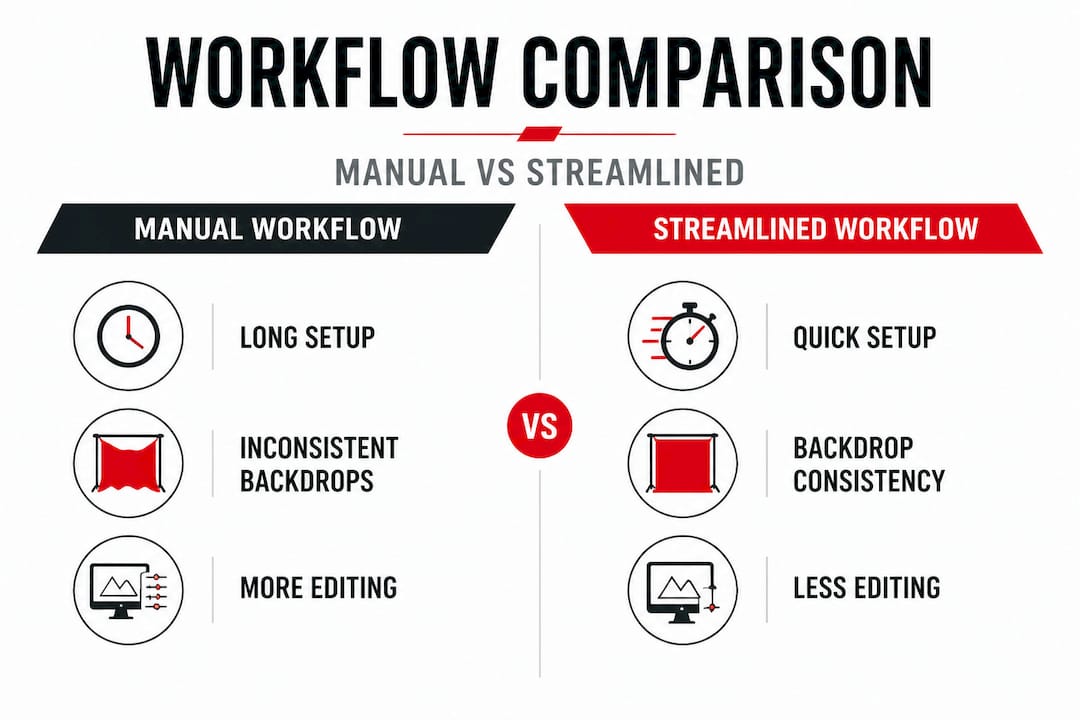
Comparison: Classic manual workflow vs. backdrop-driven streamlined workflow
| Workflow element | Classic manual approach | Streamlined backdrop-driven approach |
|---|---|---|
| Setup time | 30 to 60 minutes per product | 10 to 15 minutes per batch |
| Lighting changes | Frequent, ad hoc adjustments | Fixed once, applied to full batch |
| Background prep | Varied and inconsistent | Standardized before session starts |
| Post-production time | 20 to 45 minutes per image | 5 to 10 minutes per image |
| File organization | Done after editing | Done immediately after shoot |
| Consistency across batch | Low to moderate | High |
The difference is significant. Sellers who make the shift to a backdrop-first workflow regularly report cutting their total session time by 40 percent or more.
Pro Tip: Place small pieces of tape on your backdrop surface as markers for where to position the product. This ensures every shot in a series is framed identically, which is critical when building product listing galleries.
Troubleshooting and avoiding common workflow mistakes
Even the best-prepared studios run into issues. Let us identify and fix the biggest workflow traps before they derail your shoot.
Mistakes like inconsistent lighting or backdrop wrinkles cause more time in post-production and reduce visual quality. Recognizing these problems early keeps sessions on track.
Common workflow errors and quick fixes:
- Improper backdrop tension: A loose backdrop creates unwanted creases and shadows behind the product. Fix this by clamping all four corners before positioning any product.
- Harsh, undiffused lighting: Direct light sources without diffusers produce sharp, unflattering shadows on product surfaces. Place a white diffusion panel or shoot-through umbrella between the light and the subject.
- Inconsistent camera angles: Moving the camera between shots creates alignment problems in batch galleries. Lock the tripod head completely after your first successful test shot and never reposition it mid-batch.
- Wrong backdrop color for the product: High-contrast products on matching-tone backdrops disappear into the background. Test your backdrop color against the product before committing to the full setup.
- Skipping white balance calibration: Color shifts across batches ruin brand consistency. Use a gray card or color calibration card at the start of every session to set a manual white balance in camera.
- Not reviewing test shots at 100%. A blurry shot looks sharp at thumbnail size. Always zoom to 100 percent on your test frames before batch shooting begins.
More e-commerce backdrop tips can help you anticipate category-specific challenges, particularly for reflective or transparent products like glassware and jewelry.
Consistent lighting and properly prepped backdrops cut editing time in half. Get these two elements right before you shoot a single frame, and post-production becomes straightforward rather than remedial.
For more inspiration on how to set and style your backgrounds for different categories, backdrop styling tips offer practical, shoot-ready ideas that translate directly to cleaner images and faster turnaround.
Verifying and optimizing your results
Once you have wrapped a session, the work is not over. Let us ensure your results are flawless and find ways to get better every time.
Small tweaks in backdrop positioning and lighting after each session produce sharper, more consistent visuals over time. Verification is not a one-time task. It is a habit that compounds into significantly better work.
Quick shot verification checklist:
- Focus: Zoom to 100 percent on every hero image. Check that the product’s label, texture, or key feature is tack sharp.
- Exposure: Confirm that highlights are not blown out and shadow detail is retained. Use your histogram, not just visual judgment.
- Backdrop smoothness: Check the backdrop area in the frame for any visible creases, dust particles, or shadows that fall in awkward spots.
- Cropping consistency: Compare all images in the batch side by side at thumbnail size to verify that product size and positioning are uniform across the series.
- Color accuracy: Hold a physical product next to your screen and compare it to the on-screen image. Adjust your monitor calibration or editing preset if there is a visible shift.
Batch reviewing is faster and more accurate than reviewing images one at a time. Import the full session into your editing software and switch to grid view. Look for any frames that break visual alignment with the rest of the batch. These are the shots to flag, reshoot, or discard.
Pro Tip: Schedule a monthly workflow review session. Spend 30 minutes looking back at two or three recent batches side by side. You will quickly spot repeating issues like a recurring shadow at the same position or a consistent slight blur from camera shake, and fix them before they appear in dozens more sessions.
Building a habit of evidence-based improvement separates the photographers who plateau from those who consistently sharpen their output. If you notice that product photos with a specific backdrop are consistently converting better, that data tells you where to invest your setup time. Reviewing conversion-boosting backdrop results will show you exactly how much visual presentation influences buyer behavior.
Why a repeatable workflow matters more than trendy gear
With all the technical details covered, let us step back and reflect on what really drives long-term success in product photography.
Here is a perspective that runs against the grain of most photography marketing: your next camera body will not solve your workflow problem. Neither will a more expensive lighting kit. In our experience working with photographers and e-commerce sellers across every budget level, the consistent difference-maker is always process.
When you have a repeatable system, three things happen. Your shoots get faster because decisions are already made. Your images get more consistent because variables are locked down. And your editing time shrinks because you are correcting fewer in-session mistakes. None of that requires a $4,000 camera.
The role of backdrop in workflow quality is a perfect example of this principle. Sellers who invest in one or two high-quality, well-chosen vinyl backdrops and learn to use them consistently outperform sellers who cycle through cheap paper rolls and improvised surfaces. The backdrop becomes a fixed, reliable variable in their process. Everything else flows from that stability.
Gear tempts us because it is concrete and marketable. A new prime lens or a high-end flash kit feels like an upgrade. But a systematic shoot prep checklist, a consistent lighting diagram, and a clear file organization habit? Those are invisible upgrades that accumulate into dramatically better results over months and years.
Scalability is another reason process wins. A solo seller who has a locked-in workflow can double their product output in the same number of shooting hours. A studio that runs on reliable systems can onboard a new assistant quickly. Gadgets do not scale. Process does.
Our honest advice: pick your backdrops carefully, standardize your lighting and framing, and build a session review habit. Then leave your gear budget alone for six months and focus entirely on process refinement. You will be surprised how much your output improves without buying anything new.
Upgrade your results with quality backdrops
Ready to put these workflow tips into action? Here is how your backdrop choice can amplify every step of the system you just built.
A reliable workflow needs a reliable foundation, and that starts with your backdrop. At Instant Backdrops, we offer a curated selection of ultra-realistic vinyl backdrops in marble, wood, stone, and neutral tones, all designed to lay flat, resist stains, and hold up to the demands of commercial shooting. Whether you are photographing jewelry, food, apparel, or small goods, the right backdrop does more than fill the background. It sets the tone, speeds up your setup, and reduces the editing work that slows you down. Explore our full collection and find the backdrop that fits your product category and brand aesthetic.
Frequently asked questions
What is the most important step in a product shot workflow?
Standardizing backdrop setup and lighting creates consistent, high-quality images and reduces editing time. Consistent backdrops have the highest impact on overall image quality across a batch.
How do I keep my product photos consistent across batches?
Use backdrop placement markers and fixed lighting setups to reproduce the same look every time. Backdrops that stay fixed and repeatable make image series look cohesive and professional.
Which type of backdrop works for most products?
Neutral, non-reflective backdrops are the most versatile and ease the editing process. Neutral backdrops simplify post-shoot editing and perform well across a wide range of product categories.
Can a better workflow reduce my photo editing time?
Yes, a well-structured workflow and quality backdrop setup can significantly cut post-production efforts. A better workflow means fewer errors to correct, which translates directly into less time spent in editing software.
How does backdrop choice impact e-commerce sales?
The right backdrop makes products stand out and look professional, which directly influences buyer confidence. Quality backdrops contribute to a measurable lift in product page conversions.